> ## Documentation Index
> Fetch the complete documentation index at: https://clubhub.mintlify.site/llms.txt
> Use this file to discover all available pages before exploring further.
# Neon
To be able to develop on the `space` [tagged](https://nx.dev/core-features/enforce-project-boundaries#tags) **Nx** projects, you'll first need a database to use with [Prisma](/development/prisma).
We'll be using [Neon branching](https://neon.tech/blog/frictionless-development-experience-with-neon-branching) to setup a clone of the production database that can be used for development.
### Prerequisites
* [Discord](/development/discord)
* [Git](/development/git)
### Create a Neon branch
Assuming you have the [clubhub](https://github.com/clubhub-space/clubhub) Git repository open.
Read the technical documentation [here](/applications/trigger-neon-branch).
1. Create a new Git branch
```bash theme={null}
$ git checkout -b
```
2. Push the Git branch
```bash theme={null}
$ git push --set-upstream origin
```
3. Read the message posted in the `#neon` **Discord** channel that contains the next step. It'll look like the following below
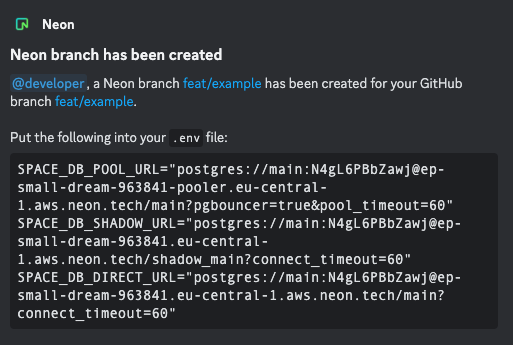 4. You have now setup a [Neon branch](https://neon.tech/docs/introduction/branching) for local development 🎉.